

GuideMacMac
Kept for Mac
The desktop is the workstation. Same account as your iPhone, with resizable columns, an inspector, a floating timer, and a keyboard that reaches everything.
Kept for Mac is not the phone app stretched wide. It is a native Mac app with a sidebar, resizable columns, menus with real shortcuts, a global capture panel, and a command palette. It shares every task, note, habit, goal, and event with your iPhone.
Download it from kept.do/mac: one universal app for Apple silicon and Intel, macOS 26 or later. Open the disk image and drag Kept to Applications to install. That download signs in with Google or an email code, and adds Continue with Apple, through Apple's sign-in page, as soon as Kept turns it on; nothing to update. The Mac App Store build uses Apple's built-in Sign in with Apple.
Setting up on MacMac
A new account runs the same setup on Mac as on iPhone. Sign in on one screen: there is no sample to try first, no invitation step, and an email that has no account yet gets one, so the code screen says Your six-digit code is on the way. with your address under it and Change email below. After the code, the window holds on setup's background for the moment your account takes to load, then setup or Today fades in. If your account does not load, Kept says You're signed in. Kept couldn't load your account. with Try again and Sign out.
Setup then keeps a rail on the left that names where you are, Focus, Cloud AI, Goal and Plan, and only the middle of the window changes between steps:
- Focus. Choose the one area that matters most right now.
- Cloud AI. Turn on Cloud AI? with six short tiles in two columns. Allow Cloud AI or Not now; Not now asks once more, Keep Cloud AI off?, with two answers of the same size. esc there keeps Cloud AI off, and return never allows it. Once you have kept it off this way, setup does not ask again on any device. An account that already allowed Cloud AI skips this step, and so does one that turned Cloud AI off itself (in Settings, or with Keep Cloud AI off on another device); the rail then shows Focus, Goal and Plan.
- Goal. Name one goal in your own words or pick a spark. Three optional questions follow: which class or project, when you could give it a real hour, and why it matters now. return moves to the next question, and return in the last one is Build my plan. Build my plan is ready as soon as the goal has words (empty the field and it waits for new ones); there is no separate step to set the goal.
- Plan. Three cards for your goal, a first action for today, a habit, and a block on your calendar, side by side on a wide window and stacked on a narrower one. Each has Keep this. The first action and the habit start kept. The block starts kept only if you chose a time on the goal step; otherwise its card offers Choose time, where you pick a day in the coming week and a start between 7:00 AM and 10:00 PM, and choosing a time keeps it. With Cloud AI on, Claude writes them and the source line says Includes suggestions from Claude; otherwise they are Kept's starter plan and appear at once. Add 3 to my plan (or 2, or 1, or Continue with nothing kept) saves setup.
return always acts on the screen you can see: it does nothing on Focus until you choose an area, and on Plan it is Add 3 to my plan only once the cards have appeared, so holding it down never saves a plan you have not read.
With VoiceOver, each step starts at its title when it arrives, so you hear the question before any button; the rail and the buttons stay where they were.
Saving hands straight to Today, with no Ready screen and no reminders step. Today's Top 3 opens with Capture one to-do first, then the first action for your goal; the todo you capture while the starter is open, from the starter or any other way in, joins right after it. Your goal is saved even if you keep no card; the first action lands on Today under that goal, the habit at its time of day on Today's habits, and the block on your Kept calendar at once. Once the block is saved, Kept also puts it on your connected calendar, the same event rather than a second one; with no calendar connected it stays on your Kept calendar. Skip setup in the rail starts you on Today with one small task instead.
When you reopen Kept on this Mac, a saved profile with setup complete and account settings checked within the last seven days let your workspace appear while Kept checks for updates. While setup is unfinished, or without a recent saved copy for your account, Kept waits for that first check before showing setup or your workspace. Returning to Kept later refreshes your data and calendars again.
The window
Three columns, each of which you can resize or hide:
- Sidebar. Today, Calendar, Goals, Tasks, Notes, in that fixed order, then Body once you track something, then Pinned, then Settings at the bottom. Settings → Sidebar can tuck Calendar away on this Mac and add or tuck Body for your account; the rest always show. Kept Workplace has retired from the Apple apps, and Cloud Agents are paused in Kept 1.8.6, so there is no Workspace, Inbox, Paper, Todos, Desk, Spaces, or agent section. The kept mark and the round Capture button stay at the top while the list scrolls; the button opens Capture.
- Workspace. The surface you chose. One button, immediately after the window's traffic lights, shows or hides the sidebar; it stays in that chrome spot on every surface, whether the sidebar is open or closed. ⌃⌘S, or View → Show/Hide Sidebar, does the same thing from the keyboard. Back and Forward follow the button as one pair, and in Notes Back to Kept comes last; none of them moves when the sidebar opens or closes. On a narrow window the sidebar becomes a temporary panel over the workspace, below the surface's title and any notice under it, instead of its own column; esc, clicking elsewhere in the window, switching to another app, or choosing a destination in it (a surface, a note, a folder or a tag, including the one already open) dismisses that panel without changing whether the sidebar counts as open, so widening the window again brings back the same full column. There is no bar across the top of the window: each column's own background runs up to the window's edge, and the surface's title sits on the same line as the kept mark in the sidebar. The title keeps that line when you hide the sidebar, resize the window, or go full screen, at the same reading inset as the rest of the page, not indented past a vacant control. Notices such as an offline or sync message sit just under the title. As you scroll, content slides out of view at the bottom of the title row, never behind the title; a thin line appears there only while you are scrolled down, and only over the column you scrolled.
- Inspector. Opens on the right when you open a task's card as a page, or when a link takes you straight to a task. Expand task gives the page the whole workspace; Collapse brings everything back. esc closes it.
The window remembers the widths and the sidebar's open or closed state you choose. At narrow sizes the columns tighten so all three stay inside the window. When you switch accounts, the window opens on Today for an account it has not shown yet, or on the surface you last had open in that account. It never opens on the other account's screen, and Back does not step into the other account's places.
Drag the empty space at the top of any column, or beside a title, to move the window. Double-click it to zoom or minimize the window, whichever you chose for title bars in System Settings. Buttons, the Notes path, search, the calendar, and the column dividers keep their own clicks and drags. Kept opens ordinary windows, never native window tabs: there is no Show Tab Bar, Show All Tabs, New Tab or Merge All Windows, even when macOS is set to prefer tabs. A window that was tabbed in an earlier version opens as its own window, with what it showed.
Today as a workspace
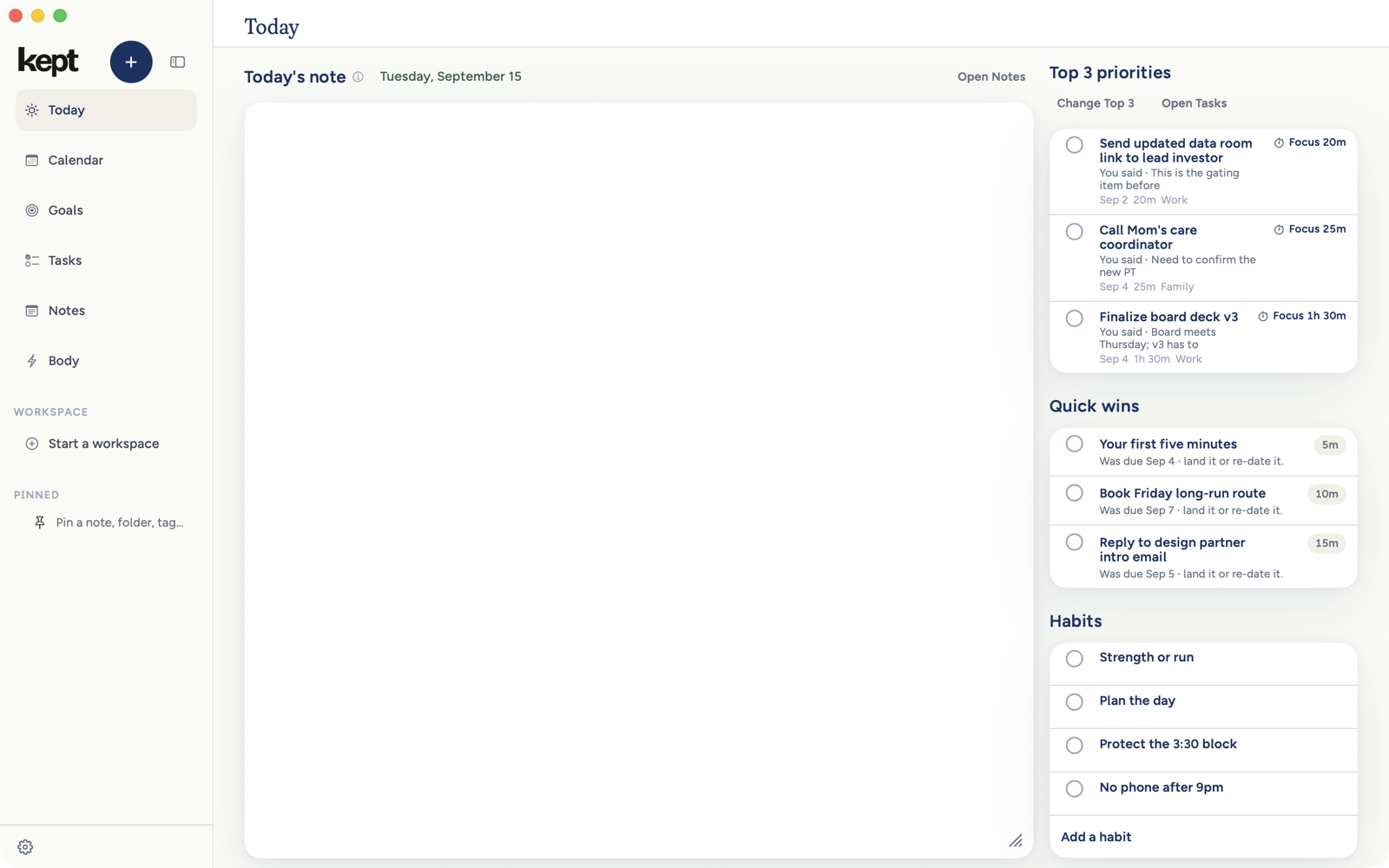
On Mac, Today is one page of priority cards, Quick wins, Habits, and the daily note. Each Top 3 card shows its short action title and the reasons it leads today. Click one to open it in the page while the day's calendar remains live beside it. The opened card holds its time, Earlier, Later, Add to calendar, steps, comments, and Your task.
Quick wins and Habits sit beside each other when the window has room. A task already in the three is left out of Quick wins. The daily note continues under those rows with no separate heading or resizable inner card. On a wide window, the day's calendar stays beside the page. Use each block's ⋯ menu to hide it for today or every day, and use Today note settings to bring it back.
Starred and Pinned
Right-click a note and choose Star note, choose it from Edit, or press ⌘D, to keep it in Starred at the top of the inner Notes library. Stars follow your account across iPhone and Mac. Choose Pin to sidebar from the note menu or Edit when you want the note under Pinned in the outer main sidebar, one click from anywhere. Folders, tags, and tasks can also be pinned there. The two choices never move each other.
Inside Notes, right-click a note for Open note, Rename, Star note, Pin to sidebar, Reveal in folder, Copy link, Copy as plain text, Share…, and Delete note. A daily note has no Rename: the day names it. Hovering Star or Pin explains where it will appear, and the information button beside Starred explains both paths.
The menu bar
A small Kept item in the menu bar opens a compact window: a capture field, Start focus with 25, 45, or an open stopwatch, what is Up next, and Today's protocol with the first five habits you can check off right there. When a focus session runs, a floating timer sits near the top-right of the screen; drag it where you like, resize it between compact and full, and hide it for the session from its menu.
Capture from anywhere
⌥Space from any app, or whatever chord you record in Settings → Capture. See Capture on Mac.
Services
Select text in any app, right-click, and choose Services → Save to Kept. The text lands straight in Notes as a note titled Saved to Kept; a transcript file works the same way.
Updates
How Kept for Mac updates depends on where you got it.
- From kept.do. Kept checks for a new version once a day and downloads it in the background. When it is ready, a small card at the bottom of the sidebar, above Settings and Report a bug, says Kept 1.9.6 is ready (with the new version's number) and Kept relaunches to finish. Install quits Kept, installs the new version, and opens Kept again. The × hides the card on this Mac until a newer version is ready; if you never click Install, the update installs the next time you quit Kept. Kept → Check for Updates… checks right away and shows what is new in a window of its own, with a progress bar while it downloads. Every update is signed by Kept and checked before it installs, so only a version Kept published can replace yours. The check does not sign in or send your account or content.
- From the Mac App Store. The App Store updates Kept, like any other app from the store. There is no card and no Check for Updates… in this version.
Appearance
Kept follows your Mac's light and dark setting, or you can pin it to Light or Dark under Settings → Appearance. Every surface, including the capture panel and the floating timer, is designed for both. Scroll bars stay narrow and quiet, grow clearer while you scroll or point at them, and still follow Show scroll bars in System Settings. Always keeps them visible, and Increase Contrast makes them wider and stronger.
What the Mac does not doMac
The Mac does not read Apple Health; those summaries arrive from your iPhone. It has no camera meal capture; type meals instead. Widgets and Live Activities are iPhone features. The Mac keeps a smaller set of Siri and Shortcuts actions: Capture, Start focus, Complete next habit, and Open Today.
Next: Keyboard shortcuts, the complete reference.