

GuideBodyiPhoneMac
Meals, sleep, and training
Body is paused in Kept 1.8.6 while its next experience is prepared.
Body is paused in Kept 1.8.6. Body does not appear in navigation, Settings, setup, Capture, widgets, Control Center, search, Siri, or Shortcuts for now. Body-derived Trends choices are also absent. Links and older shortcuts that opened Body or the meal camera open Today instead. The app carries no HealthKit entitlement and does not read Apple Health. Kept keeps every meal, workout, sleep record, health setting, and saved layout choice. Nothing is deleted, and a future update can restore each person's prior Body setup.
When available, Body holds meals, sleep, workouts, and lifts in one account-scoped view, and it draws the trends that follow. The implementation remains in Kept while the founder prepares its next version. The sections below document the preserved experience for its return.
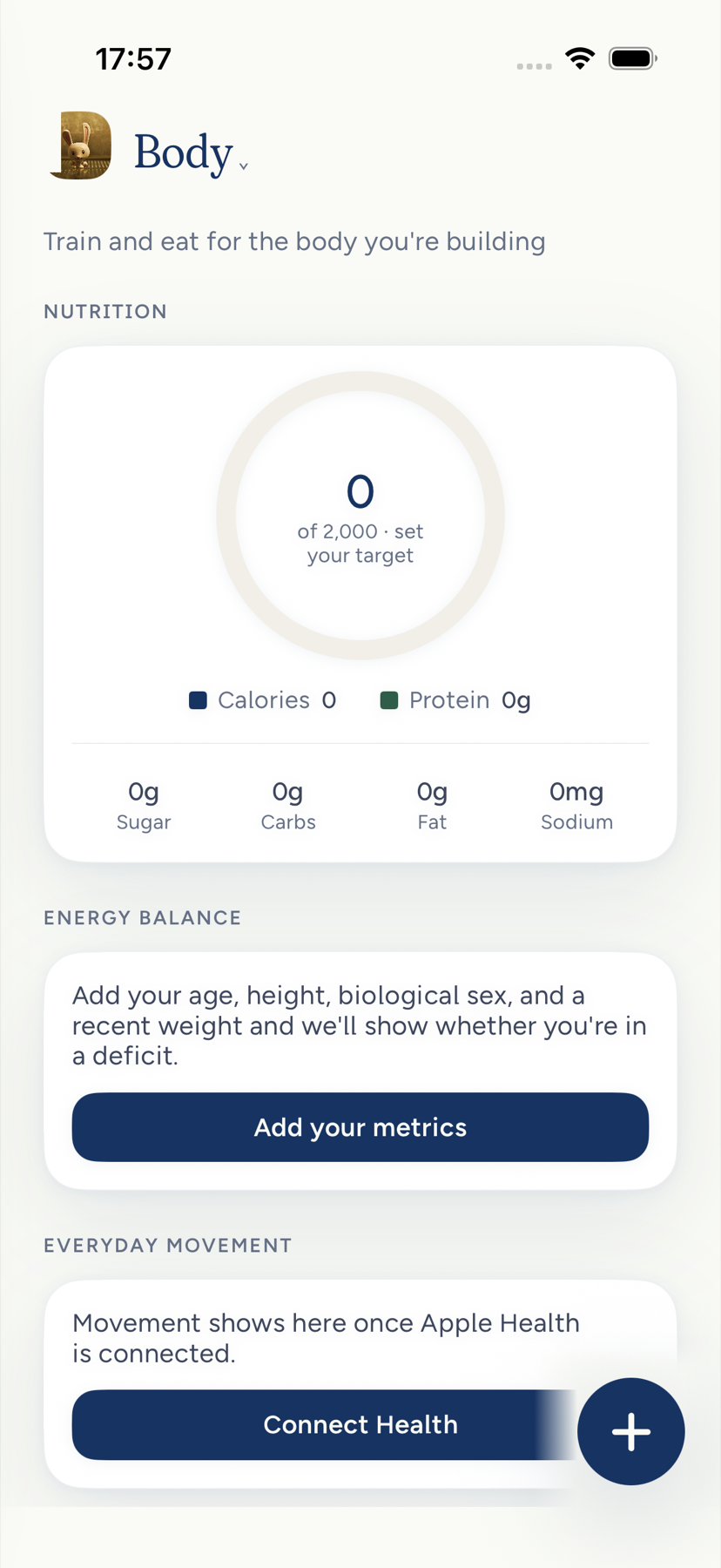
Log a meal
Three ways, all of which end in the same record:
- Snap a meal. Tap Snap a meal in Body, or + then Meal, point the camera at the plate, and Kept reads the portions and grounds the macros. Review the items, rename or resize any of them, set when you ate, and tap Log this meal. Upload does the same from your photo library. If Kept has read a very similar plate before, it offers Use this instead of analyzing again.
- Type a meal. Tap Type a meal and write it the way you would say it: "two eggs and toast". Kept looks each food up in a nutrition reference, never guessing the numbers, and names anything it could not match so you can rename the line. On Mac, type the meal on the Body page, choose Read it, then Log it.
- By hand. Enter it by hand takes a name, calories, and optional macros. With Cloud AI off, this is the form Kept offers everywhere.
- Ask. Tell the assistant what you ate. It drafts the foods and sends you to Body to keep or drop the draft. It never claims the draft was already saved.
Every meal opens into a deep dive: nutrition facts marked as an estimate, a processing grade, a Health score with the reasons behind it, and a tip. About these numbers explains how the score is built, and Nutrition principles in Settings lets you pick a diet and tune the scoring. You remain the authority on what you ate; delete any meal from its … menu or with a swipe in Meal history, with an Undo right after.
The written reasons under the score name only what moved the number, largest first, and say whether it follows Kept's balanced defaults or a rule you switched on in Nutrition principles. What you write in your own words there shapes the tip and the emphasis, never the number, and Kept replaces a reason that says otherwise, or that names a factor worth nothing, with one built from the score itself. They call the sugar factor total sugar, because it counts all the sugar in the meal, the natural sugar in fruit and milk included. The tip reads the same score, so a plain yogurt is not treated as a sugar spike, and it anchors on one thing, chosen by Kept rather than the model: a drink with alcohol, recovery after training, a real sugar hit, late caffeine, or a meal light on protein. When nothing needs flagging, it credits what lifted the score most. The tip is not given the meal's calories, and a tip that talks about them anyway is written again. It draws on what Kept remembers about how you eat and what you train for, and leaves out memories about an injury or a medical topic.
The calorie ring fills against a target once you have entered your Health specs: date of birth, height, weight, and optionally gender. Until then it shows of 2,000 · set your target. Energy balance then says whether you are in a deficit or a surplus so far today, with More detail for the full-day burn estimate and a week of bars. The coach line on that card names one next move from what you have eaten today, such as one meal's share of your protein guide. It is only given a weight-loss pace when you have set a goal to lose weight, never for a goal to gain or hold steady, and never for a weight goal that names only a target, such as Reach 70 kg, because Kept cannot tell which way you are headed. Every number in the line comes from your own day. If the line Kept writes names a number your day does not hold, it is written once more, and if it still does, you see a plain line built from your own protein numbers instead, such as Build your next meal around about 30 g of protein.
Sleep
Last night's sleep sits on Body once Apple Health has synced it. Tap the card for that night: time asleep, efficiency, and stages where they were recorded. Sleep history holds older nights. Kept does not invent stages, baselines, or conclusions; a missing value says unavailable rather than zero.
Sleep belongs to the morning you woke. If you traveled, bed and wake times show in the time zone the night was recorded in.
Workouts and strength
Workouts arrive from Apple Health on iPhone, or you log one from Log workout, which offers five presets: Easy run, Tempo run, Push day, Pull day, and Mobility. On Mac, a workout takes a name and optional minutes. Rename or delete a workout from its long-press menu; Apple Health is never changed. Lifts take an exercise, a weight, and whole reps; Kept shows the estimated one-rep max as you type and marks a new PR when you beat it. The Strength section appears once a goal names a lift or you have logged a set.
If you follow a training plan for a goal, Kept can match a recorded run to the planned session and ask you to confirm. A plain easy run matches automatically when its distance or time meets the plan. Anything with intervals or pace targets waits for your confirmation.
Trends and insights
Trends, under Settings → AI & your data on iPhone, charts weight, your best lift, and progress on your goals, alongside a life-balance read across your areas when Cloud AI has prepared one. On Mac, Insights in Settings shows resting and daily burn, weekly balance, best estimated one-rep max, and habits kept over seven days. Estimates only, never medical advice.
Body on MacMac
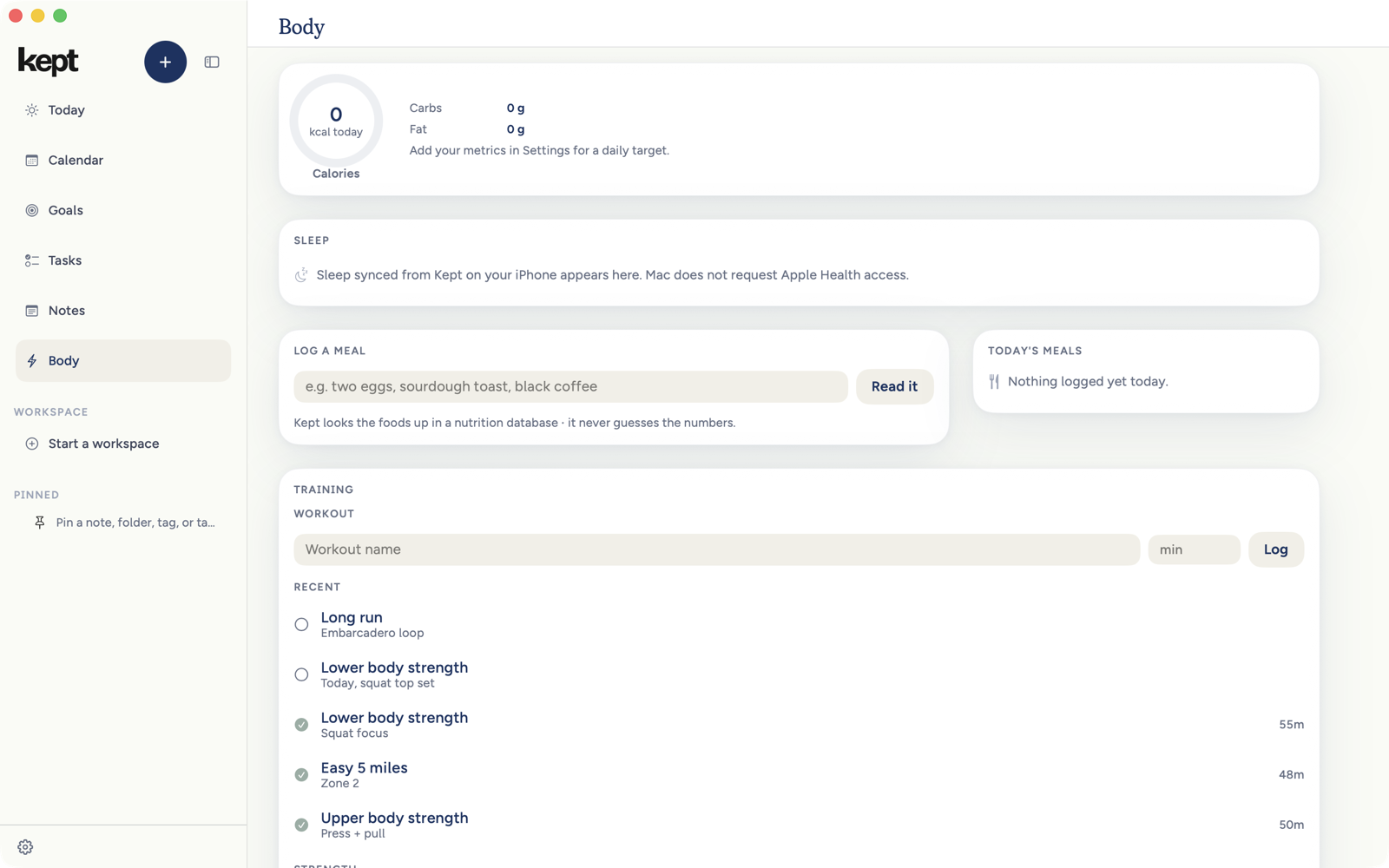
Body on Mac is three parts: today's nutrition rings and last night's sleep, Log a meal by typing beside today's meals, and Training with a workout form and a strength form in one card. The Mac does not read Apple Health itself; sleep and Health workouts arrive from your account after the iPhone syncs them.
Next: Apple Health and Kept.